The best app development strategies can help startups and small businesses build a useful app without wasting money. Want to turn your idea into an app? Start with simple features, understand your customers, set a clear budget, and test your app before launch. Let’s explore the best strategies.
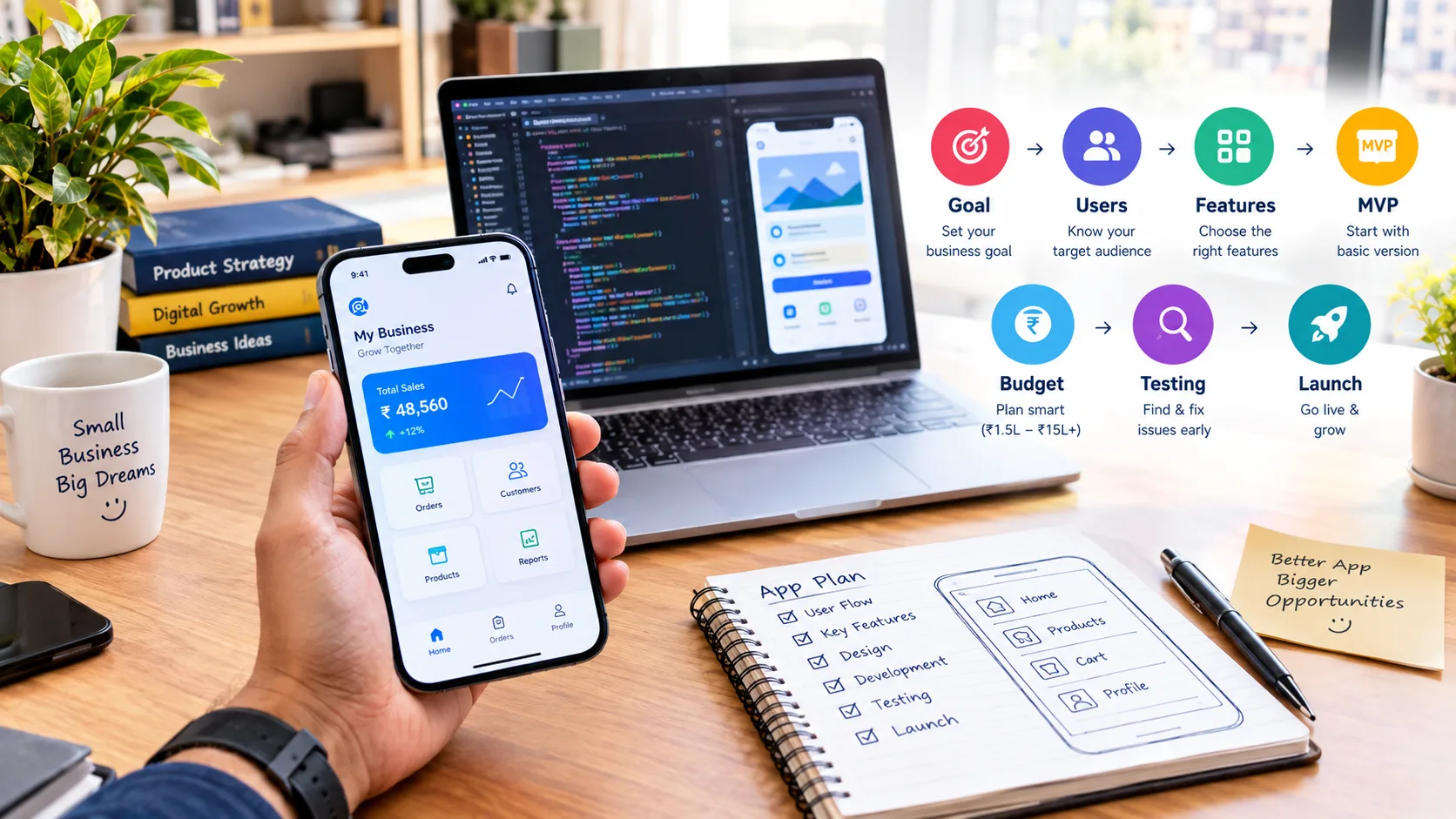
Start With a Clear Business Goal
The best app development strategies for startups and small businesses start with one question: What problem will the app solve?
Your app should have one clear purpose, such as:
✅ Book appointments
✅ Sell products
✅ Provide learning content
✅ Improve customer support
Measure Your Success 📊
Track simple results like:
App downloads
Active users
Orders or bookings
Leads
Revenue
A clear goal helps you build the right app and avoid unnecessary features.
Know Your Target Users
Before building an app, understand who will use it.
Ask:
Who are my users?
What problem do they have?
What device do they use?
What do they expect?
Keep the app simple with:
✅ Clear buttons
✅ Simple menus
✅ Easy forms
✅ Readable text
✅ Fast-loading screens
If your users have weak English or limited technical knowledge, use simple words and familiar icons.
Choose Features Carefully
A good app development strategy should focus on useful features, not too many features.
Start with an MVP — the first version with only the most important features.
For example, a food delivery app may start with:
✅ User login
✅ Product listing
✅ Cart
✅ Payment
✅ Order tracking
Add advanced features later when users need them.
Use the Must-Have Rule
Must-have → Build now
Useful → Add later
Nice-to-have → Test first
This can save time and development costs.
Plan Your Budget and Development Approach
App cost depends on features, design, platform, security, and development time.
Your budget may include:
UI/UX design
App development
Backend and database
Testing
Hosting
APIs and third-party tools
App store fees
Maintenance
Keep some extra budget for unexpected changes.
Choose the Right Development Option 📱
You can choose native or cross-platform development.
Choose based on:
✅ Your users
✅ Your budget
✅ App features
✅ Performance needs
✅ Future plans
Do not choose a technology only because it is popular.
Test the App Before Launch
Testing is one of the most important app development strategies because even a well-designed app can have problems.
Users may leave your app if it crashes, loads slowly, or has confusing screens.
Before launch, test all important features and check how the app works on different devices.
Test Important App Features ✅
Make sure important features work correctly.
For example, test:
User registration
Login and logout
Search
Product pages
Cart
Payments
Booking
Notifications
Forms
Customer support
Password reset
If your app has online payments, check successful payments, failed payments, refunds, and payment confirmation.
If your app has booking, check whether users can select the right date and time and receive the correct confirmation.
Small problems in these areas can create a bad user experience.
Test on Different Devices 📱
Your users may have different phones, screen sizes, and operating systems.
So, do not test the app on only one device.
Check:
Different screen sizes
Different Android versions
Different iOS versions, if needed
Slow internet connections
Mobile data
Wi-Fi
Older devices
The app should remain easy to use and readable across different screens.
Check Speed and Performance ⚡
Users do not want to wait too long for an app to load.
Check how quickly:
The app opens
Pages load
Images appear
Search works
Payments process
Notifications arrive
Large images, unnecessary features, or poor backend performance can make an app slow.
A simple and fast app can give users a better experience than an app with many features that takes too long to load.
Get Feedback From Real Users 👥
Before launching the app to everyone, let a few real users try it.
Ask simple questions:
Was the app easy to use?
Was anything confusing?
Could you find what you needed?
Did any feature stop working?
Was the text easy to understand?
What would you change?
Real users may notice problems that your development team missed.
Fix Problems Before Launch 🛠️
Do not ignore small bugs if they can affect users.
Create a list of problems and fix important issues first.
Focus on:
Payment problems
Login issues
Crashes
Broken buttons
Slow screens
Wrong information
Security problems
A proper testing process can help you launch with more confidence.
Launch Smart and Keep Improving
Building the app is not the final step. After launch, you need to understand how users are using it and continue improving the app.
Do not expect the first version to be perfect.
Your users will show you what works and what needs improvement.
Start With a Simple Launch 📢
You do not always need a big launch campaign.
Start by making your target users aware of the app.
You can promote your app through:
Social media
Your website
Email
WhatsApp
Google Ads
Meta Ads
Existing customers
Content marketing
For example, if you already have a local business with regular customers, tell them about your new app and explain how it can make their experience easier.
Track App Performance 📊
After launch, track important numbers.
You can monitor:
App downloads
Active users
New registrations
Orders
Bookings
Leads
Revenue
User retention
Reviews
App crashes
Uninstall rates
These numbers can help you understand whether the app is helping your business.
For example, if many people download the app but very few complete orders, you may need to improve the buying process.
Listen to User Reviews ⭐
Reviews and feedback can give you useful ideas.
Users may tell you:
Which feature they like
What is difficult to use
What is missing
Where the app has problems
What they want in future updates
Do not ignore negative feedback. It can help you find problems and improve the user experience.
Keep the App Updated 🔄
Technology and user expectations change over time.
Your app may need regular updates for:
Bug fixes
Security improvements
Performance
New features
Design improvements
Operating system changes
Regular updates can help keep the app useful and reliable.
However, do not add new features just because they are trending. Add features that solve real user problems.
Use Data to Make Better Decisions 📈
After launch, use real user data to decide what to improve.
For example:
If many users leave during registration, make the signup process simpler.
If users search for a product that is difficult to find, improve navigation.
If customers often contact support about the same problem, improve that part of the app.
This makes app development an ongoing process instead of a one-time project.
Get Help With Digital Growth 🌐
Building a useful app is only one part of growing your business online.
You also need to bring users to your app and build awareness.
Digital marketing can help with:
SEO
Social media marketing
Google Ads
Meta Ads
Content marketing
Website development
Online brand promotion
TZAP Marketing provides digital marketing, website, and related online services to help businesses build and grow their online presence.
Conclusion
The best app development strategies for startups and small businesses start with a clear goal and real user needs.
✅ Keep the first version simple.
✅ Choose useful features.
✅ Plan your budget carefully.
✅ Test before launch.
✅ Keep improving after launch.
A simple, useful app can be a better choice than an expensive app with too many features.
📚 Want to Learn More?
If you want to explore more about AI, marketing, and business, these guides may help:
👉 How to Grow a Business With Marketing: A Practical Guide
👉 Small Business Ideas With Big Potential for New Entrepreneurs to Start
👉 Best Business Ideas for the Future
👉 Business Ideas You Can Start With Low Investment
Frequently asked questions
What is the most important app development strategy for a startup?
Start with a clear business goal and solve one real customer problem. A focused first version is easier to build, test, and improve.
Should a small business build an MVP first?
Yes. An MVP can help a business test its idea with essential features before spending heavily on a complete app.
How can startups reduce app development costs?
Start with essential features, choose the right platform, plan the design carefully, compare development options, and avoid unnecessary features in the first version.
How long does it take to develop a small business app?
It depends on the app's features and complexity. A simple app may take a few weeks to a few months, while larger apps can take much longer.
Is post-launch app maintenance necessary?
Yes. Apps may need bug fixes, security updates, operating-system support, performance improvements, and new features after launch.